- Quick Steps to Cancel Factor Meals
- 1. Log In to Your Account
- 2. Open Plan Settings
- 3. Find the Status Section
- 4. Select “Deactivate Plan”
- 5. Confirm the Cancellation
- Troubleshooting Desktop Cancellation Issues
- Try Incognito or Private Mode
- Clear Browser Cache
- Check Third-Party Billing
- Contact Support
- How to Cancel Factor Meal Subscription on iPhone (iOS)
- Cancel Through Apple Subscriptions
- Cancel Through the Factor App
- 1. Open the App and Sign In
- 2. Open Profile Settings
- 3. Tap “Deactivate Plan”
- 4. Confirm Cancellation
- If the Deactivate Button Is Missing on iPhone
- How to Cancel Factor Meal Subscription on Android
- 1. Open the Factor App
- 2. Open Profile or Menu
- 3. Find Subscription Controls
- 4. Tap “Deactivate Plan”
- Android Troubleshooting Tips
- Restart the App
- Update or Reinstall
- Clear App Cache
- Use a Browser Instead
- Factor Meal Cancellation Policy
- Before You Cancel Factor Meal Subscription
- Important Things to Check
- Quick Checklist
- Pause vs Cancel Factor Meal Subscription
- Having Trouble Cancelling Your Factor Meal Subscription?
- Use a Different Browser
- Use Private Browsing
- Check Billing Source
- Contact Factor Meal Support
- Factor Meal Subscription Plans and Pricing (2026)
How to Cancel Your Factor Meal Subscription
Factor offers fresh, ready-to-eat meals through a weekly subscription service. If the plan no longer fits your budget or schedule, you can cancel your subscription from your desktop, iPhone, or Android device.
Most plans cost between about $80 and $200 per week depending on the number of meals you choose. Cancelling your subscription can help reduce recurring food expenses if you’re no longer using the service regularly.
You can manage your account through the official Factor website or mobile app.
Read:
- FabFitFun Return Policy: Refunds, Damaged Items and Subscription Cancellation
- Blue Apron Refund Policy: Returns, Delivery Issues And Account Cancellation
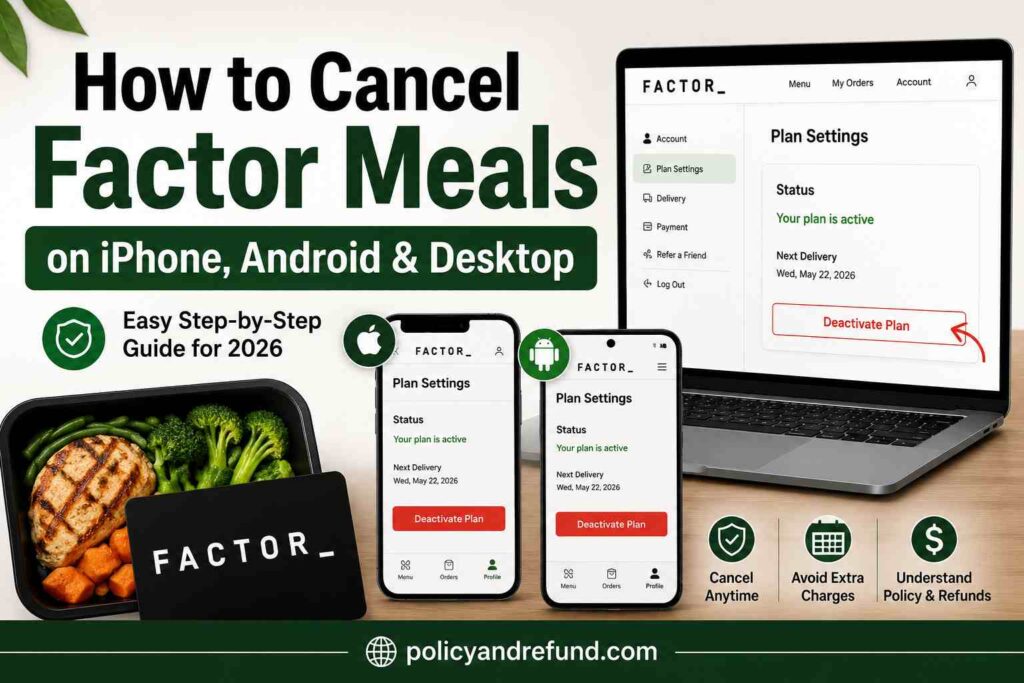
Quick Steps to Cancel Factor Meals
- Log in to your account
- Open Plan Settings
- Scroll to Status
- Select Deactivate Plan
- Confirm cancellation
If you experience delivery issues, billing problems, or damaged meals, save screenshots, photos, and order details before cancelling.
How to Cancel Factor Meal subscription on Desktop or Laptop
Using a desktop browser is usually the easiest way to cancel Factor Meal subscription because all account settings are easier to access.
1. Log In to Your Account
Visit the Factor login page and sign in using your email and password.
If you forgot your password, use the “Forgot Password” option before continuing.
2. Open Plan Settings
Click your profile icon or name in the top-right corner of the screen, then select Plan Settings.
This section shows your:
- Active plan
- Upcoming delivery date
- Payment information
- Subscription status
3. Find the Status Section
Scroll down until you see the Status section near the bottom of the page.
4. Select “Deactivate Plan”
Click Deactivate Plan to start the cancellation process.
Do not choose Skip a Week unless you only want to pause deliveries temporarily.
5. Confirm the Cancellation
Factor Meals may ask why you’re leaving or offer discounts to keep your subscription active.
Continue until you receive:
- A confirmation message on-screen
- A cancellation confirmation email
- An inactive subscription status in your account
Troubleshooting Desktop Cancellation Issues
Try Incognito or Private Mode
Sometimes cached browser data hides important buttons.
Open a private browsing window and sign in again.
Clear Browser Cache
If the cancellation button is missing, clear your browser cache or switch browsers.
Chrome, Firefox, and Edge usually work best.
Check Third-Party Billing
If you signed up through a bundle or promotional partner, you may need to cancel through that provider instead of Factor meals.
Contact Support
If the website will not process your cancellation, contact Factor customer support using live chat or phone support.
Have these details ready:
- Account email
- Full name
- Last delivery date
How to Cancel Factor Meal Subscription on iPhone (iOS)
If you subscribed through Apple, you may need to cancel through your Apple subscriptions instead of the Factor app.
Cancel Through Apple Subscriptions
Go to:
Settings → Your Name → Subscriptions
Then locate Factor and cancel the subscription.
Cancel Through the Factor App
If you subscribed directly with Factor, follow these steps.
1. Open the App and Sign In
Launch the Factor app and log into your account.
2. Open Profile Settings
Tap the profile icon and select Plan Settings.
3. Tap “Deactivate Plan”
Scroll down and tap Deactivate Plan.
4. Confirm Cancellation
Follow the prompts until you receive confirmation that your subscription has been cancelled.
Also check your email for a confirmation message.
If the Deactivate Button Is Missing on iPhone
Try these fixes:
- Force-close and reopen the app
- Update the app from the App Store
- Reinstall the app
- Use the desktop website instead
If none of these steps work, contact Factor support directly.
How to Cancel Factor Meal Subscription on Android
Android users can cancel through the app or mobile browser.
1. Open the Factor App
Sign into the correct account.
2. Open Profile or Menu
Tap the profile icon or menu button, then select Plan Settings.
3. Find Subscription Controls
Scroll down to locate the cancellation section.
4. Tap “Deactivate Plan”
Follow the prompts until you receive confirmation that the subscription has been cancelled.
Android Troubleshooting Tips
Restart the App
Close the app fully and reopen it.
Update or Reinstall
Install the latest version from Google Play.
Clear App Cache
Go to:
Settings → Apps → Factor → Storage → Clear Cache
Use a Browser Instead
If the app does not work properly, log in through Chrome and use the desktop version of the website.
Factor Meal Cancellation Policy
Factor has a strict cancellation deadline.
You usually must cancel before:
Wednesday at 11:59 PM CT before your next delivery week.
If you miss the cutoff, your next order may already be processed and billed.
Processed orders are generally non-refundable unless there is:
- A billing error
- A damaged delivery
- A service issue approved by support
You can check your upcoming delivery date inside your account dashboard.
Before You Cancel Factor Meal Subscription
Before cancelling your subscription, review your account carefully.
Important Things to Check
- Unused credits may disappear after cancellation
- Deleting the app does not cancel your subscription
- Upcoming deliveries may still process if you miss the cutoff
Quick Checklist
- Redeem available credits
- Check your next delivery date
- Save receipts or order history if needed
Pause vs Cancel Factor Meal Subscription
If you only need a temporary break, you may prefer to:
- Skip a week
- Pause deliveries temporarily
These options keep your account active while avoiding short-term deliveries.
If you want recurring billing to stop completely, choose Deactivate Plan instead.
Having Trouble Cancelling Your Factor Meal Subscription?
If you cannot cancel normally, try these solutions.
Use a Different Browser
Switch between Chrome, Firefox, Safari, or Edge.
Use Private Browsing
Incognito mode often fixes hidden button problems.
Check Billing Source
If you subscribed through another provider, cancellation may need to happen there.
Contact Factor Meal Support
Prepare the following information:
- Account email
- Full name
- Recent order date
You can say:
“I want to cancel my Factor Meal subscription. Please deactivate my plan and confirm the cancellation.”
If your billing date is close, contact support immediately to avoid another charge.
Factor Meal Subscription Plans and Pricing (2026)
Here’s a simple overview of common Factor meal Subscription plans.
| Plan Size | Price Per Meal | Estimated Weekly Total |
|---|---|---|
| 6 Meals | About $13.49 | About $81 + shipping |
| 8 Meals | About $12.99 | About $104 + shipping |
| 10 Meals | About $12.49 | About $125 + shipping |
| 12 Meals | About $11.99 | About $144 + shipping |
| 14 Meals | About $11.49 | About $161 + shipping |
| 18 Meals | About $10.99 | About $198 + shipping |
Prices may change based on promotions, shipping fees, and add-ons.
The 18-meal plan usually offers the lowest cost per meal for larger households.
For updated pricing and plan details, check the official Factor plans page.