- How to Use the Partial Refund Calculator on
- Step-by-Step: Running a Calculation
- Reading the Results Panel
- Estimated refund amount
- Total deductions
- Refund percentage
- The breakdown list
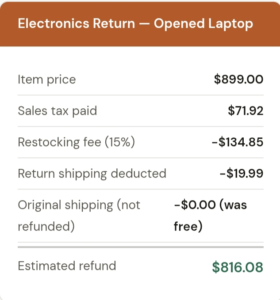
- Here is Another Two Examples Worth Knowing. Scenario A: Returned electronics with restocking fee
- Scenario B: Fashion return with paid return label
- Tips From Using This Partial Refund Calculator
- Check the store policy for “both” restocking fee types
- The “partly / not sure” options exist for good reason
- Use the Reset button between different scenarios
- The Partial Refund Calculator supports NGN for Nigerian shoppers
- Does the tool connect to Amazon, Walmart, or any retailer?
- What if my refund arrives lower than what the calculator estimated?
- Can I use it for partial refunds on services, not just physical products?
- Does it work on mobile?
[partial_refund_calculator]
How to Use the Partial Refund Calculator on
You returned the item. The store accepted it. But then the refund arrived and it was $23 short and no one explained why. That scenario plays out thousands of times a day, and it’s exactly what the Partial Refund Calculator was built to address. This guide walks you through every field, every toggle, and every number the tool produces. So you can go into any return knowing exactly what you’ll get back.
Learn more on our : online-shopping-return-policies and Groceries Refund policy
Here’s a breakdown of every input in this calculator:
| Field Name | What to Enter | Required? |
|---|---|---|
| Currency | Choose USD ($), GBP (£), EUR (€), or NGN (₦) from the dropdown. This controls the symbol shown in results. It doesn’t convert currencies. | Required |
| Item price | The original purchase price of the item you’re returning before any tax. | Required |
| Sales tax paid | The actual tax amount you were charged at checkout. Check your receipt; don’t estimate. | Optional |
| Original shipping paid | What you paid to receive the item originally. Enter 0 if shipping was free. | Optional |
| Return shipping cost | The cost of sending the item back. If the store provides a prepaid label and deducts it from your refund, enter that amount here. | Optional |
| Restocking fee (%) | Many electronics and furniture retailers charge a percentage of the item price. Enter the number only (e.g. type 15 for 15%). | Optional |
| Restocking fee (fixed) | Some sellers charge a flat fee regardless of item value (e.g. $10 flat). You can fill in both the percentage and fixed fee if a store charges both. | Optional |
| Missing parts / damage deduction | Any amount the store has stated they’ll deduct for an incomplete return (missing charger, torn box, scuffs, etc.). | Optional |
| Is sales tax refunded? | Three options: Yes, Partly / not sure, or No. If you don’t know, choose “Partly / not sure” and the tool accounts for ambiguity. | Required |
| Is original shipping refunded? | Three options: No, Yes, or Partly / not sure. Default is No, which is the most common real-world scenario. | Required |
Step-by-Step: Running a Calculation
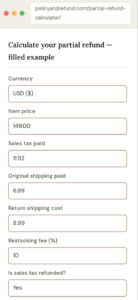
Let me walk you through the tool exactly as I use it. For example: returning a $149 Bluetooth speaker to an online retailer that charges a 10% restocking fee, deducts $8.99 return shipping from your refund, and does not refund the original $6.99 shipping.
-
Select your currency
The dropdown at the top reads “USD ($)” by default. If you’re in the UK or EU, change it now it won’t affect the math, just the symbol displayed in your results. I’m in a USD transaction, so I leave it as-is.
-
Enter the item price
Type 149 in the “Item price” field. This is the price before tax and don’t include tax here because there’s a separate field for that. The field accepts decimal values (e.g. 149.99).
-
Fill in sales tax paid
My receipt shows $11.92 in sales tax. I enter 11.92. If you paid no tax (common for some categories or states), enter 0 or leave it blank.
-
Add original shipping and return shipping
Original shipping was $6.99. I enter 6.99. Return shipping that the store will deduct is $8.99. I enter 8.99. Notice these are two separate fields because they’re treated differently: original shipping is only refunded if the store says so, while return shipping is a deduction from what you receive.
-
Enter the restocking fee
The retailer’s policy says 10% restocking fee on opened electronics. I enter 10 in the “Restocking fee (%)” field. The fixed fee field I leave blank they don’t charge both.
-
Set the tax and shipping toggles
The two dropdown questions at the bottom are easy to miss on mobile. Scroll down past the fee fields. For “Is sales tax refunded?” I choose Yes. For “Is original shipping refunded?” I choose No (the store’s policy clearly says original shipping is non-refundable).
-
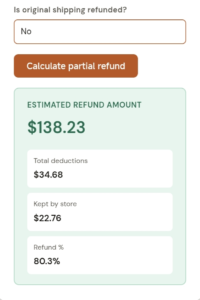
Hit “Calculate partial refund”
The orange button at the bottom of the form runs the calculation instantly. No loading screen the results appear in the panel just below the button. If you want to start over, the grey “Reset” button clears all fields at once.
Reading the Results Panel
Once you click calculate, three pieces of information appear immediately below the form. Here’s what each one means:
Estimated refund amount
This is the headline number the dollar figure you can reasonably expect to hit your account. In our example, that’s $138.23. Not the $160.92 you originally paid (item + tax), and not the $149 sticker price. The calculator backs out every deduction you entered, so this number reflects reality rather than wishful thinking.
Total deductions
This line shows everything the store is taking out, combined. In our scenario that’s the restocking fee ($14.90) plus return shipping ($8.99) plus non-refunded original shipping ($6.99) adding up to approximately $30.88. If this number surprises you, go back and look at which toggle answers contributed most. Often the original shipping field alone accounts for a significant chunk.
Refund percentage
This is the figure I find most useful for making a decision. If the calculator shows you’re getting back 40% on a $200 item, it suddenly clarifies whether the return is actually worth initiating. For expensive purchases where the math is borderline, this percentage is the number to discuss with the retailer’s support team when asking for a goodwill adjustment.
The breakdown list
Below the three summary numbers, the calculator renders an itemised breakdown each deduction listed individually. This is the part you can screenshot and use in a customer service conversation. It’s harder for a support agent to dismiss a clearly itemised breakdown than a vague complaint that “my refund seems low.”
Here is Another Two Examples Worth Knowing. Scenario A: Returned electronics with restocking fee
 PolicyAndRefund.com
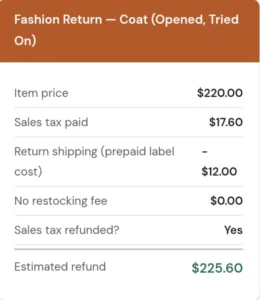
Scenario B: Fashion return with paid return label
Tips From Using This Partial Refund Calculator
Check the store policy for “both” restocking fee types
The calculator has two separate restocking fee fields one for percentage and one for fixed amount because some retailers charge both. A marketplace seller I dealt with in early 2025 charged a flat $5 handling fee on top of a 10% restocking fee. Most people filling out return forms don’t realise those are additive until they see their refund statement. Enter both numbers if the policy lists both.
The “partly / not sure” options exist for good reason
When you’re genuinely unsure whether original shipping is refunded, the tool offers a middle toggle: Partly / not sure. I’d recommend using this rather than guessing Yes or No. The tool factors it into the estimate conservatively, giving you a more realistic floor for your refund.
Use the Reset button between different scenarios
If you’re comparing whether to return one item versus another, the grey Reset button clears everything instantly. It’s faster than manually clearing each field and avoids the risk of a leftover number from a previous calculation contaminating your new estimate.
The Partial Refund Calculator supports NGN for Nigerian shoppers
This is worth highlighting because most Western refund tools don’t include Naira. The currency dropdown includes NGN (₦), making it useful if you’re dealing with a local or international retailer shipping to Nigeria. The math works identically only the currency symbol changes.
Does the tool connect to Amazon, Walmart, or any retailer?
What if my refund arrives lower than what the calculator estimated?
Can I use it for partial refunds on services, not just physical products?
Does it work on mobile?
The Partial Refund Calculator on solves a specific, annoying problem: the gap between what you expect back from a return and what actually arrives. It handles the complexity of stacked deductions, restocking fees, return shipping, non-refundable original shipping, damage charges in a single form with no login and no fluff.